
You don't need to be flexible. You need a place to begin.
Stiff knees, sore backs and busy minds aren't a problem to fix here — they're simply where we start.
Book your free first class
26 years in one room
Ann founded the North Perth Yoga Room in 1999 with Katrina Robertson — both having begun their own yoga journeys at the WA School of Yoga. More than two decades on, Ann remains NPYR's principal teacher, with a small team of certified Iyengar teachers taking the occasional class alongside her, held to the same exacting standard.
She holds a Sports Science honours degree from Edith Cowan University and is a Senior Level 3 certified Iyengar teacher — a position she's attained by learning alongside the teachers and mentors who have devoted their lives to this lineage, Iyengar Yoga. As Chair of the West Australian Iyengar Yoga Teachers Association, she stays actively involved in growing the method across the state, training and supporting the teachers who come after her.
A quiet, steady room
No wall of mirrors. No race to the front. Just people who decided to look after themselves — many of them for years.
The newly retired
Time to fill, energy to spend. Often the most surprised — "I wish I'd come sooner."
Working professionals
Here to put the day down. Less noise in the head, looser shoulders, better sleep.
Sore backs & knees
Staying strong without grinding the joints. The props do the heavy lifting.
Athletes cross-training
Length after load. Fewer niggles, better recovery, a wider range to move through.
Seniors, 75+
Mobility, balance, and a coffee catch-up afterwards. The social part matters too.
Nervous first-timers
More welcome than you think. We'll show you every prop and every option.
The pose is shaped to fit you
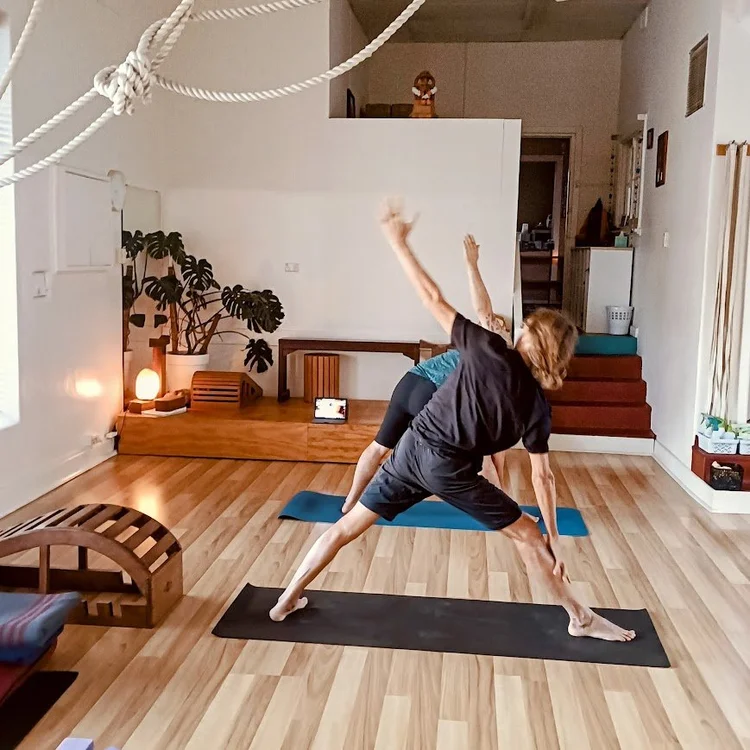
Most "beginner-friendly" classes ask your body to fit the pose. Iyengar yoga does the opposite. Belts, blocks and wall ropes make each posture available to every body — stiff hips, a dodgy knee, a back that complains in the morning, all accounted for.
It's the most widely taught yoga method in the world for a reason: exacting, safe, and it works. Classes here are small and the teaching is close. You leave standing taller and thinking clearer — with room to reflect rather than rush.
What students say
Rated 5.0 across our Google reviews
Start with a complimentary first class
No experience needed. No flexibility required. Just turn up — we'll do the rest.
Book your free first class5A Blake Street, North Perth · a five-minute walk from the heart of the suburb